
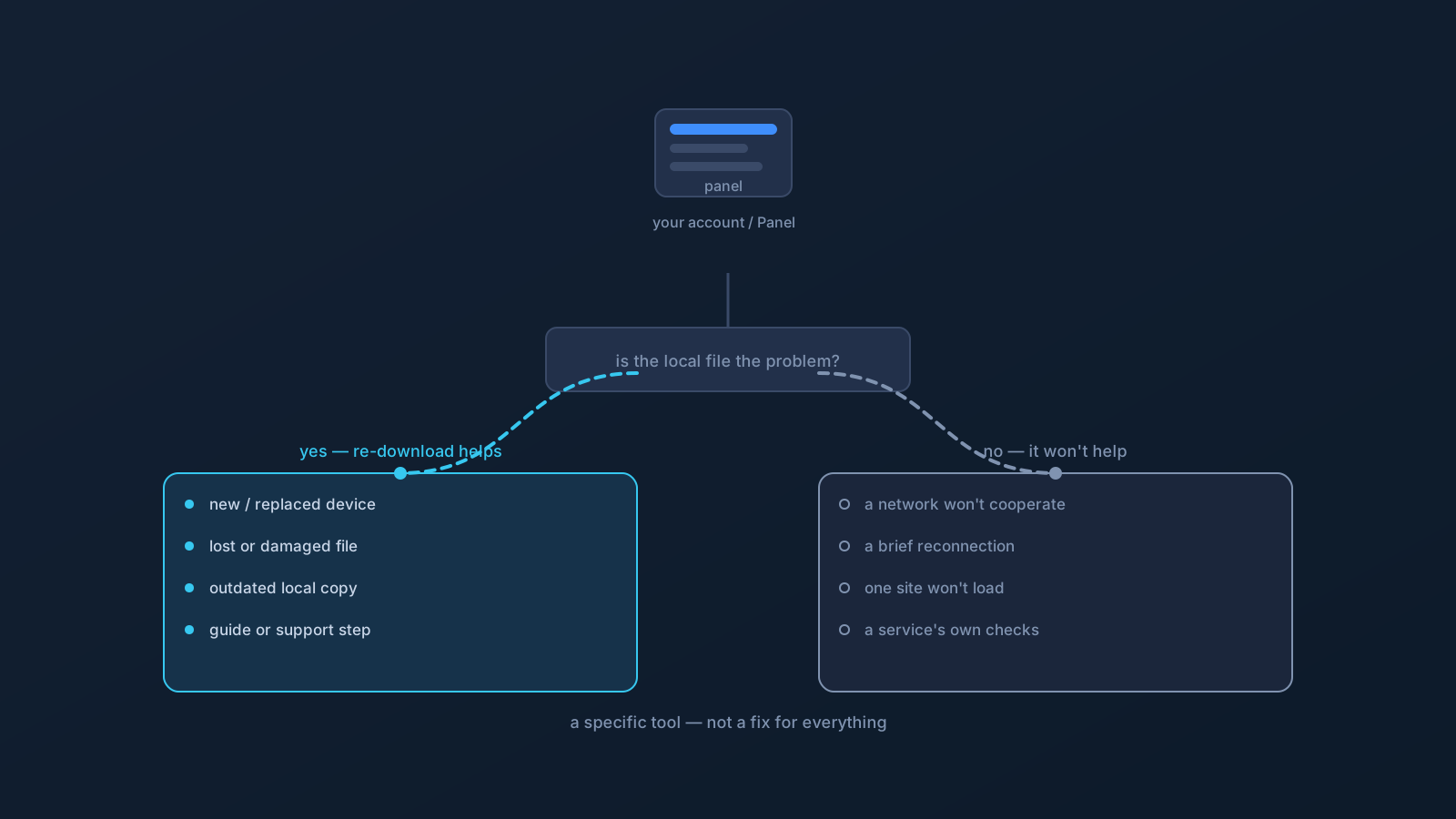
When something's off with a VPN, "re-download the profile" is common advice — and sometimes it's exactly right. But it isn't a cure-all, and reaching for it reflexively can send you chasing the wrong thing while the real cause sits untouched. This is a plain guide to telling the two apart: when a fresh profile genuinely helps, and when it changes nothing.
The reassuring baseline: re-downloading is safe and simple when you do need it. The point of this article is mostly to save you effort when you don't — and to be clear that a fresh profile is one specific tool, not a fix for everything.
What re-downloading actually does
Re-downloading gives you the current profile as your own account provides it right now — a fresh copy from your own profile in the Lisar Panel, set up the supported way: download the .ovpn file, open OpenVPN Connect, choose Upload File, import and save the profile, and connect. That's genuinely useful in a specific situation: when the profile you're using locally is missing, damaged, or out of date. If the local file is the problem, a fresh one from the Panel is the direct answer.
What it does not do is change anything outside the profile file itself. It doesn't alter your network, your device's state at a given moment, a website's behavior, or a service's account checks. Holding that boundary in mind is what separates the cases below.
When re-downloading makes sense
A fresh profile is a reasonable move in these situations:
A new or replaced device. Setting up a device gets its profile fresh from your own Panel account — not a copy carried over from another machine. This is standard, not troubleshooting.
A lost, moved, or damaged local file. If the profile file is gone, can't be found, or didn't finish downloading properly, re-downloading is the direct fix — you're replacing a file that isn't usable.
An outdated local copy. If you're working from a file saved a while ago and things aren't matching, a fresh download ensures you're using the current profile rather than an old one. Profiles have lifecycles, and the Panel reflects the current state.
A guided troubleshooting step. If a Lisar setup guide, or official Lisar support, suggests re-downloading as part of resolving something, that's a good reason — it's a deliberate step in a specific context.
Profile status appears to have changed. If your profile's status looks different in the Panel, or setup guidance points you to refresh, getting the current profile aligns your local copy with what the Panel shows. What that status means and any account-side specifics belong with the Panel and official support.
The thread through all of these: the local profile file is plausibly the thing that's wrong or missing. That's exactly when a fresh copy helps.
When re-downloading probably won't help
Just as important is recognizing when a fresh profile is beside the point, because the cause lives elsewhere:
A network that won't cooperate. If a specific network is the problem — a captive portal not completed, a network with its own restrictions — a new profile file doesn't change the network. Testing on another network is the more useful move.
A momentary connection drop after a network change. Reconnection around sleep, roaming, or a Wi-Fi switch is normal and self-resolving; it's a reconnection matter, not a profile-file one.
A single website not loading. If one site won't load while others do, that points at the site, the browser, or the network — not the profile shared by everything. The calm diagnostic order covers it.
A service's own account or security check. A sign-in that won't complete or a verification prompt is the service's account layer, unaffected by which copy of your profile you hold. That path is the service's own process.
Expecting it to fix everything. This is the big one: re-downloading is a specific tool for a specific problem — a bad or missing local file — not a cure-all that resolves unrelated issues. If the local file isn't plausibly the cause, a fresh copy mostly costs you time.
A quick decision aid
Ask one question: is the local profile file itself plausibly the problem?
- If yes — missing, damaged, outdated, new device, or a guide/support step tells you to — re-download from your own Panel account. It's the right, simple move.
- If no — the trouble is a network, a reconnection, a single site, or a service's own checks — a fresh profile won't address it, and the matching article or the service's own support is the better path.
Doing it safely when you do
When re-downloading is the right call, the standing habits apply. Get the file fresh from your own profile in the Lisar Panel — not from an old saved copy, a messaged link, or anyone else's hands — and keep it to your own devices, since a profile file is sensitive setup material that isn't for sharing or forwarding. Import it through the supported flow and connect.
And keep account-side matters where they belong: this article is about the practical decision to refresh a local file, not about account actions. Anything concerning your profile's status or account specifics is a matter for the Lisar Panel and official Lisar support, which are the source of truth. Used for the right reason, a fresh profile is a clean, simple step — and knowing when not to reach for it is just as valuable.
Frequently asked questions
When should I re-download my VPN profile? When the local profile file itself is plausibly the problem: a new or replaced device, a lost, moved, or damaged file, an outdated saved copy, a change in profile status shown in the Panel, or when a Lisar setup guide or official support suggests it. In those cases a fresh copy from your own Panel account is the direct move.
Will re-downloading my profile fix a website that won't load? Usually not. A single site failing points at the site, the browser, or the network — not the profile shared by everything else. Re-downloading changes the profile file, not those. The calm diagnostic order for a site that won't load is the better path.
My VPN dropped briefly when I switched networks — should I re-download? No — that's normal reconnection around a network change, and it's self-resolving. It's a reconnection matter, not a profile-file one; giving it a moment or toggling the connection in the client is the ordinary step.
Does a fresh profile help with a sign-in or verification prompt? No — that's the service's own account and security layer, unaffected by which copy of your profile you hold. The way through is the service's own verification and support process, not a new profile file.
Where should I re-download my profile from? Your own profile in the Lisar Panel, fresh — not an old saved copy, a messaged link, or anyone else's file. Keep it to your own devices, since a profile file is sensitive setup material, and import it through the supported flow.