
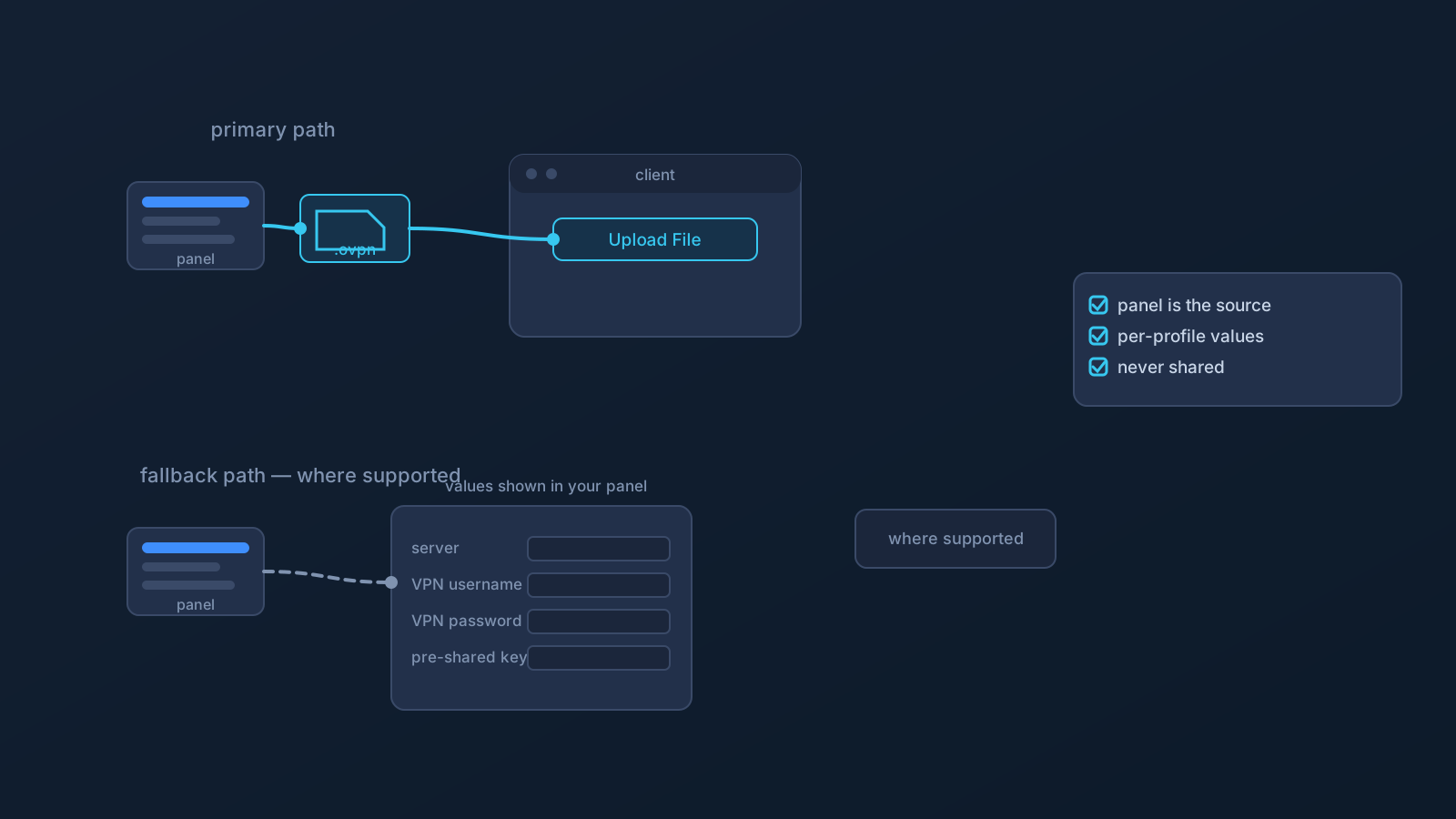
Lisar's primary OpenVPN setup is deliberately simple: download the .ovpn file, open OpenVPN Connect, choose Upload File, import and save the profile, connect. For most supported devices, that's the whole story.
L2TP/IPsec is the other chapter — a fallback setup path available where it's supported, not the primary method everywhere. This article covers what "fallback where supported" actually means, how L2TP/IPsec setup differs from the OpenVPN flow, and how to handle its details safely.
One primary path, one fallback
The relationship between the two paths is worth stating plainly, because it sets every expectation that follows. The OpenVPN .ovpn file flow is the primary supported setup. L2TP/IPsec is a fallback option offered where it's supported — which means its availability can vary by platform, setup scenario, and what applies to a specific profile.
Neither this article nor Lisar's positioning ranks the two on security or performance; that's not a comparison this article makes. The practical distinction is simpler: one is the default path to try first, and one exists for situations where the default path isn't available or doesn't fit.
When the fallback may apply
The honest answer to "when should I use L2TP/IPsec?" is: when Lisar's setup guidance for your device and profile points you there. Some platforms' setup guides cover L2TP/IPsec where it's supported — typically device or OS scenarios where the OpenVPN Connect path isn't the right fit — and the Lisar Panel and setup guides show what applies to a specific profile and device.
What the fallback is not: a general alternative to reach for on a hunch, a workaround for a network that's blocking something, or a way around device policy on a managed machine. If the OpenVPN path is supported for your device, that's the path; if it isn't, the relevant setup guide says what is.
How L2TP/IPsec setup differs
Here's the real practical difference. The OpenVPN flow is built around a file — the profile travels into OpenVPN Connect as a download and an upload. L2TP/IPsec setup works the other way: it typically uses the operating system's own built-in VPN settings, and it may require manually entering a small set of values — the server address, VPN username, VPN password, and IPsec pre-shared key — where those values are shown by Lisar for your profile.
Two rules keep that manual step safe and sane. First, the values come from your own profile in the Lisar Panel and the L2TP/IPsec setup guide for your device — exactly as shown, never guessed, never reused from an old note or someone else's setup. Second, this manual-entry pattern belongs to L2TP/IPsec setup specifically; it is not how OpenVPN setup works. The supported OpenVPN flow is built around the downloaded .ovpn file. If OpenVPN Connect or a Lisar setup guide asks for any required fields, use only the values shown in the Lisar Panel or official setup instructions for that profile.
Handling L2TP/IPsec details safely
A server address, username, password, and pre-shared key are sensitive setup material — the same category as a downloaded .ovpn profile file, deserving the same habits. They stay out of chats, shared documents, notes, and screenshots; they aren't forwarded to anyone who doesn't specifically need them; and any screenshot sent to support gets checked for these values first.
The "VPN Profile File Safety" article covers the full set of habits. They transfer one-to-one: whether a profile's setup information arrives as a file or as values to enter, it's yours, it comes from your Panel, and it isn't shared.
What the fallback does not change
Every expectation that applies to VPN setup generally applies here unchanged. L2TP/IPsec setup doesn't guarantee access to any particular website, app, or service; doesn't guarantee anonymity or any particular speed; doesn't make any network fully safe by itself; and doesn't mean every device, OS version, router, or network supports it.
It also changes nothing about device policy: on company- or client-managed devices, what can be configured is decided by the device's policy, and a fallback protocol is not a way around that.
Checking what applies to you
The deciding facts are always specific: your device, your profile, your plan. The Lisar Panel shows your profile's details, the setup guides show the supported paths per device — including where L2TP/IPsec applies — and official support is the place for anything the guides don't settle. Start with the OpenVPN .ovpn flow where it's supported; let the guides tell you when the fallback is the right chapter.
Frequently asked questions
Should I use OpenVPN or L2TP/IPsec with Lisar? Start with the primary path: the OpenVPN .ovpn file download with Upload File in OpenVPN Connect, where it's supported for your device. L2TP/IPsec is a fallback where supported — Lisar's setup guides show when it applies.
Why does L2TP/IPsec setup ask me to type values in when OpenVPN doesn't?
They're different setup patterns. L2TP/IPsec typically uses the OS's built-in VPN settings and may require entering the server address, VPN username, VPN password, and IPsec pre-shared key where Lisar shows those values. The supported OpenVPN flow is built around the downloaded .ovpn file. If OpenVPN Connect or a Lisar setup guide asks for any required fields, use only the values shown in the Lisar Panel or official setup instructions for that profile.
Where do I get the L2TP/IPsec values from? Only from your own profile in the Lisar Panel and the L2TP/IPsec setup guide for your device — exactly as shown. Never guess, and never reuse values from old notes or someone else's setup.
Is L2TP/IPsec less secure than OpenVPN? That's not a comparison this article makes. Both are supported paths where offered; the practical distinction is primary versus fallback, and the setup guides say which applies to your device.
Does the fallback path work on every device or get around network or device restrictions? No. Availability varies by platform and profile, no setup path is guaranteed on every device or network, and no protocol choice is a way around device policy or a service's own rules.