
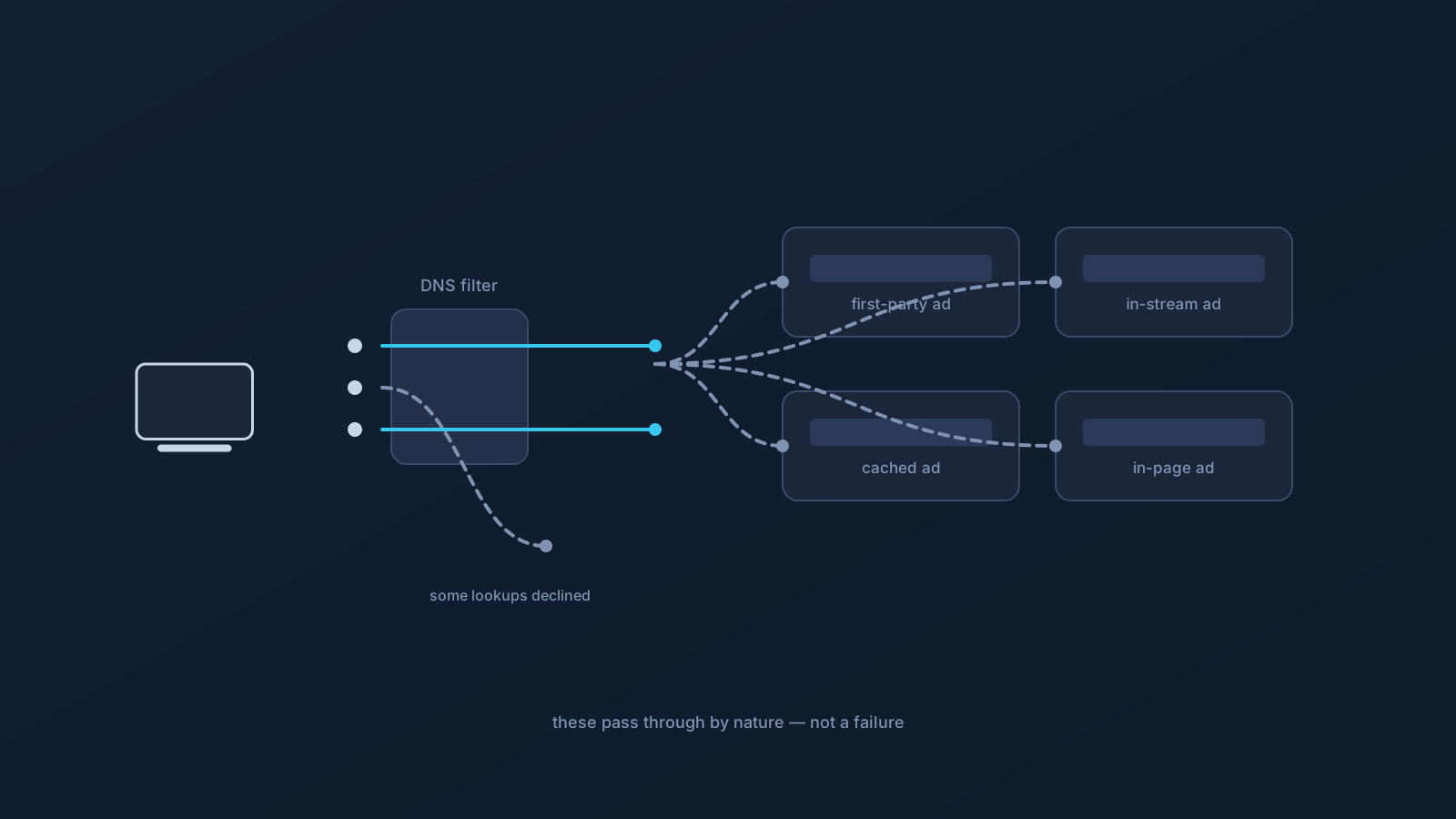
You've got DNS filtering enabled and you're still seeing some ads. Before assuming something's broken, here's the honest explanation: DNS filtering works at the domain level, and while it can reduce some unwanted lookups where available, it was never able to remove every ad or tracker. The ads that remain are usually the specific kinds a domain-level filter can't act on — by nature, not by failure.
This article is expectation-setting: what DNS filtering does, and the categories of ads that slip through it no matter how well it's working.
What DNS filtering actually does
DNS filtering acts at the name-lookup step. When a device asks about a domain the filter treats as unwanted, that lookup can be declined, and content that would have loaded from that domain doesn't get fetched. With Lisar, DNS AdBlock works at this level where a plan includes it, reducing some unwanted DNS lookups that pass through the profile's DNS path. GeoDNS, DNS AdBlock and Custom Exit are available according to plan.
The key phrase is "at the domain level." The filter sees requests for whole domains — not the insides of pages, not individual elements, not what's already on your screen. That single fact explains every category below.
First-party ads on the same domain
The clearest gap: ads served from the same domain as the site you're visiting. When a site hosts its own ads — or serves sponsored content from its own domain — there's no separate unwanted-domain lookup to decline. To a domain-level filter, that content is coming from the site you want to reach, so declining it would mean declining the site itself.
This is why plenty of large sites' own promotional content appears normally with DNS filtering on. It isn't slipping past a weak filter; it's simply not the kind of thing a domain-level tool is built to catch.
In-stream and in-content ads
Ads woven into a stream or a piece of content — the kind that arrive as part of the content itself rather than as a separate fetch from an ad domain — are similarly out of reach. If the ad comes down the same pipe as the thing you're watching or reading, there's no distinct lookup to filter.
The general pattern: when advertising is delivered inside content rather than loaded alongside it from a separate domain, a lookup-level filter has nothing separate to act on. That's a structural limit of filtering by domain, shared by any tool that works at that layer.
Already-loaded and cached content
Timing creates another category. Content that already loaded before filtering applied is already there — filtering acts on new lookups, not on what's on screen. And cached content, held locally from an earlier visit, may appear without a fresh lookup happening at all.
So a page you had open, or one your device partly remembers, can show elements a filter would otherwise have influenced on a fresh load. This usually sorts itself out on a clean reload later, and it's a normal effect of how caching works rather than a filtering fault. (The companion article on DNS caching covers why changes don't always take effect immediately.)
App-level and mixed-domain behavior
Apps complicate the picture because many rely on domains they also need for ordinary function. When advertising or tracking rides on a domain an app genuinely uses to work, declining that lookup wouldn't cleanly remove the ad — it could break the app. A domain-level filter can't always separate "the part of this domain I don't want" from "the part this app needs," because it decides per domain, not per element.
The honest consequence: some app-level advertising persists precisely because the alternative — blocking a needed domain — would be worse than the ad. This is a limit of the layer, not a setting to hunt for.
What this means for expectations
Put together, the categories point to one realistic expectation: DNS filtering, where available, can reduce some unwanted domain-level lookups, and it will not remove every ad, sponsored element, or tracker. That's true of DNS AdBlock and true of any domain-level filtering anywhere — the layer has a defined reach, and the remaining ads mostly live outside it.
Two more honest notes belong here. Filtering unwanted lookups is a tidiness and comfort matter, not device protection — it isn't a substitute for device security practices. And whether DNS AdBlock applies to a given profile is a plan fact, confirmed in the Lisar Panel rather than assumed. Set expectations at "meaningfully fewer, not none," and the feature does what it honestly can.
If filtering seems to do nothing at all
There's a difference between "some ads remain" (expected) and "filtering seems entirely absent" (worth a look). If you expected DNS AdBlock and see no effect whatsoever, the useful checks are whether your plan includes it (confirmed in the Panel), whether you're actually connected, and whether cached or already-loaded content is masking the effect on a page you had open. A fresh load on a network you trust, while connected, is the fair test — and if it still seems off, official Lisar support is the place to bring specifics.
Frequently asked questions
Why do I still see ads if DNS filtering is on? Because DNS filtering acts at the domain level and can't remove every ad. First-party ads on the site's own domain, in-stream ads delivered inside content, already-loaded or cached content, and app ads riding on needed domains all fall outside what a domain-level filter can act on.
Does DNS AdBlock block all ads and trackers? No — where a plan includes it, it can reduce some unwanted DNS lookups that pass through the profile's DNS path, not remove everything. The realistic expectation is meaningfully fewer, not none; several ad types are structurally outside a domain-level filter's reach.
Why do some sites' own ads always get through? Because they're served from the same domain as the site you want. A domain-level filter can't decline that lookup without declining the site itself, so first-party and same-domain sponsored content appears normally — that's by design, not a weak filter.
I enabled filtering but nothing changed at all — what should I check? That's different from a few ads remaining. Confirm your plan includes DNS AdBlock (checked in the Lisar Panel), that you're actually connected, and that cached or already-loaded content on an open page isn't masking the effect. Test with a fresh load on a trusted network.
Is DNS filtering a security feature? No — treat it as tidiness and comfort, not protection. Reducing some unwanted lookups isn't a substitute for device security practices, and it makes no security guarantee.