
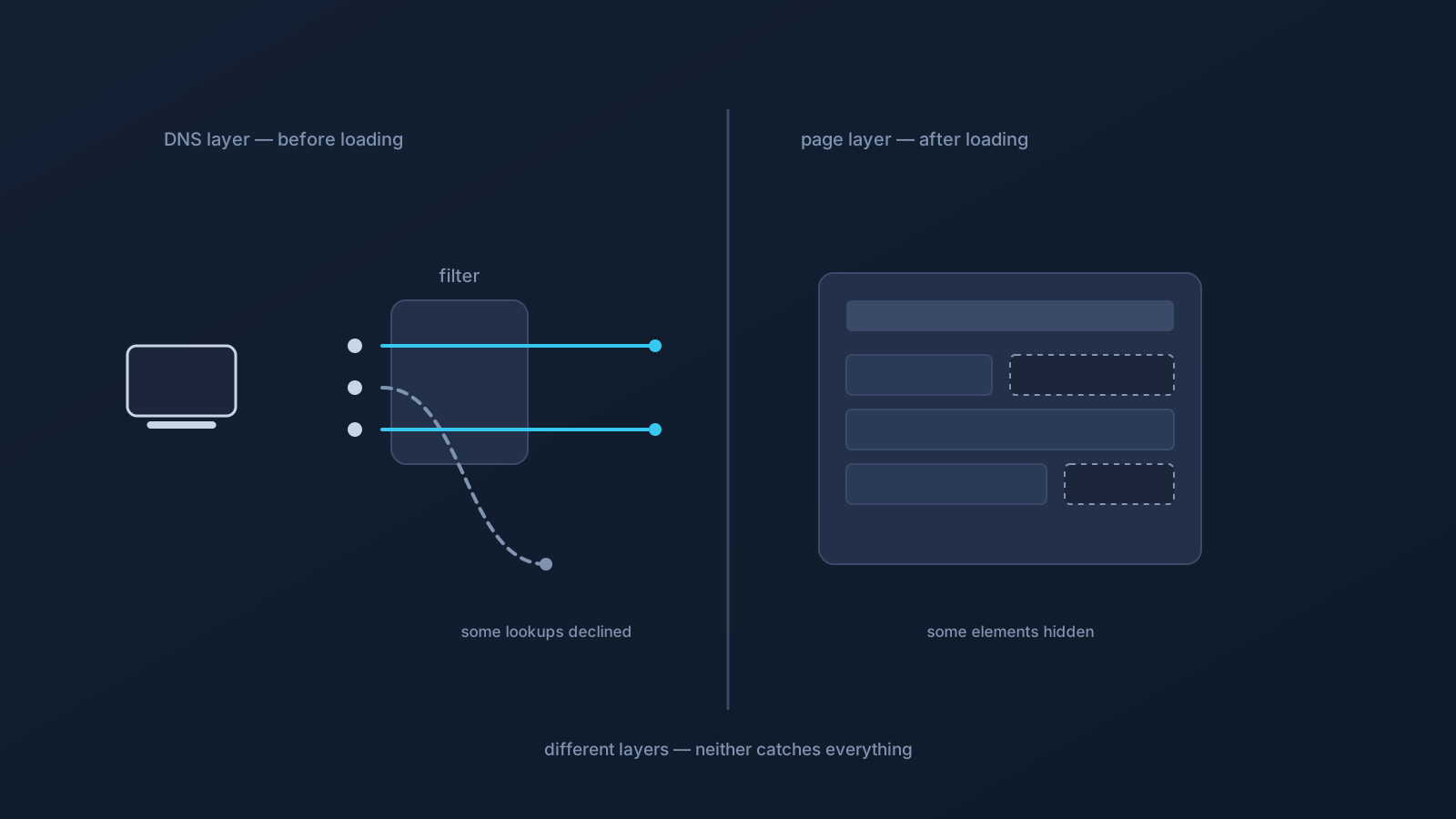
"Ad blocking" is one phrase covering two genuinely different tools. DNS-level filtering works on name lookups — the step where a device asks where a domain lives — and can decline to complete some of those lookups. Browser-based blocking works inside the page — examining what a site loads and hiding or stopping elements it recognizes. Same goal, different layer, different strengths, different blind spots.
Understanding the difference sets honest expectations for both — including for DNS AdBlock, where a Lisar plan includes it.
What DNS-level filtering does
Every connection to a named service starts with a lookup, and DNS-level filtering sits at that step. When a device asks about a domain that the filter treats as unwanted, the lookup can be declined, and whatever would have loaded from that domain simply doesn't get fetched. Because this happens before content arrives, it works the same way regardless of which app or browser made the request — the filter sees lookups, not pages.
That's the strength: one layer, applying across the connection's DNS path, with nothing to install per app. With Lisar, DNS AdBlock works at this level where a plan includes it, reducing some unwanted DNS lookups that pass through the profile's DNS path. GeoDNS, DNS AdBlock and Custom Exit are available according to plan.
What DNS-level filtering cannot see
The lookup layer's strength is also its boundary. DNS filtering acts on domains — whole names — so it has no view inside a page. Content served from the same domain as the site itself doesn't present a separate lookup to decline: a sponsored element hosted by the site you're visiting, a promotion woven into a feed, or anything already loaded before filtering applied is outside what a domain-level decision can touch. App-level trackers that ride on domains an app also needs for its ordinary function pose the same problem — declining the lookup would break the app, not just the tracking.
So the honest statement is scope, not failure: DNS filtering can reduce some domain-based lookups, and it cannot remove every ad, every sponsored element, or every tracker. Nothing at the DNS layer can.
What browser-based blocking does differently
Blockers that run in the browser see what DNS filtering can't: the page itself. They can examine elements as a site loads, recognize patterns, and hide or stop specific pieces — including some same-domain content that never presented a separate lookup. That in-page view is why a browser-based tool can visually clean a page in ways a lookup-level filter can't.
The trade-offs mirror the strengths. Browser tools work where they're installed — that browser, on that device — and don't extend to other apps or devices by themselves. They rely on recognizing what to act on, sites change, and some content is indistinguishable from the page's ordinary function. Browser-based blocking reduces what it recognizes; it doesn't remove everything either. (Lisar's side of this comparison is the DNS layer — DNS AdBlock is not a browser tool and doesn't act inside pages.)
Layers, not rivals
Because the two tools act at different layers, comparing them as rivals misses how they actually relate: they overlap on some things and each reaches where the other can't. A domain-level filter can decline lookups for every app on the connection's DNS path; an in-page tool can tidy what loads from allowed domains. Neither substitutes for the other, and neither — separately or together — removes every unwanted element. Users who expect "clean everything" from any single layer will be disappointed by all of them; users who expect each layer to do its own job tend to be satisfied.
One more boundary belongs to both: filtering unwanted elements is a comfort and tidiness matter, not a protection one. Neither DNS filtering nor in-page blocking is a substitute for device security practices, and neither should be leaned on as one.
Setting expectations before enabling anything
Three questions set expectations well. First, what layer am I adding — lookups or pages — and what does that layer inherently miss? Second, what's in scope — the connection's DNS path, or one browser on one device? Third, what's my plan actually include — with Lisar, whether DNS AdBlock applies to a given profile is a plan fact, checked in the Lisar Panel rather than assumed.
Answer those honestly and both tools become what they really are: useful, bounded, and best judged by what they're for.
A last practical note on evaluating either layer: judge it over days, not minutes, and on the sites and apps you actually use. Filtering behavior varies with what you visit, and first impressions formed on one page generalize badly. A week of ordinary use tells you what a layer is worth to you; a single before-and-after glance mostly tells you about that page — and about the expectations you brought to it.
Frequently asked questions
What's the actual difference between DNS ad blocking and browser ad blocking? The layer. DNS filtering acts on name lookups before content loads, so it applies across the connection's DNS path but can't see inside pages. Browser-based blocking acts inside pages it can see, but only in that browser on that device. They catch different things and miss different things.
Why do I still see some ads with DNS filtering on? Because DNS filtering decides at the domain level. Content served from the same domain as the site itself, sponsored elements woven into a page, and anything already loaded don't present a separate lookup to decline — that's the layer's inherent boundary, not a malfunction.
Does Lisar's DNS AdBlock work inside my browser like a page-level blocker? No. DNS AdBlock works at the DNS level where a plan includes it — reducing some unwanted lookups that pass through the profile's DNS path. It doesn't act inside pages, and it isn't a browser tool.
Should I use DNS filtering or a browser blocker? They're layers rather than rivals: each reaches where the other can't, and neither removes everything. Which combination suits you depends on what you want tidied and where — one browser, or the connection's DNS path generally.
Does ad filtering protect my device? Treat it as comfort and tidiness, not protection. Neither DNS-level nor in-page filtering substitutes for device security practices — keep those separate in your thinking.