
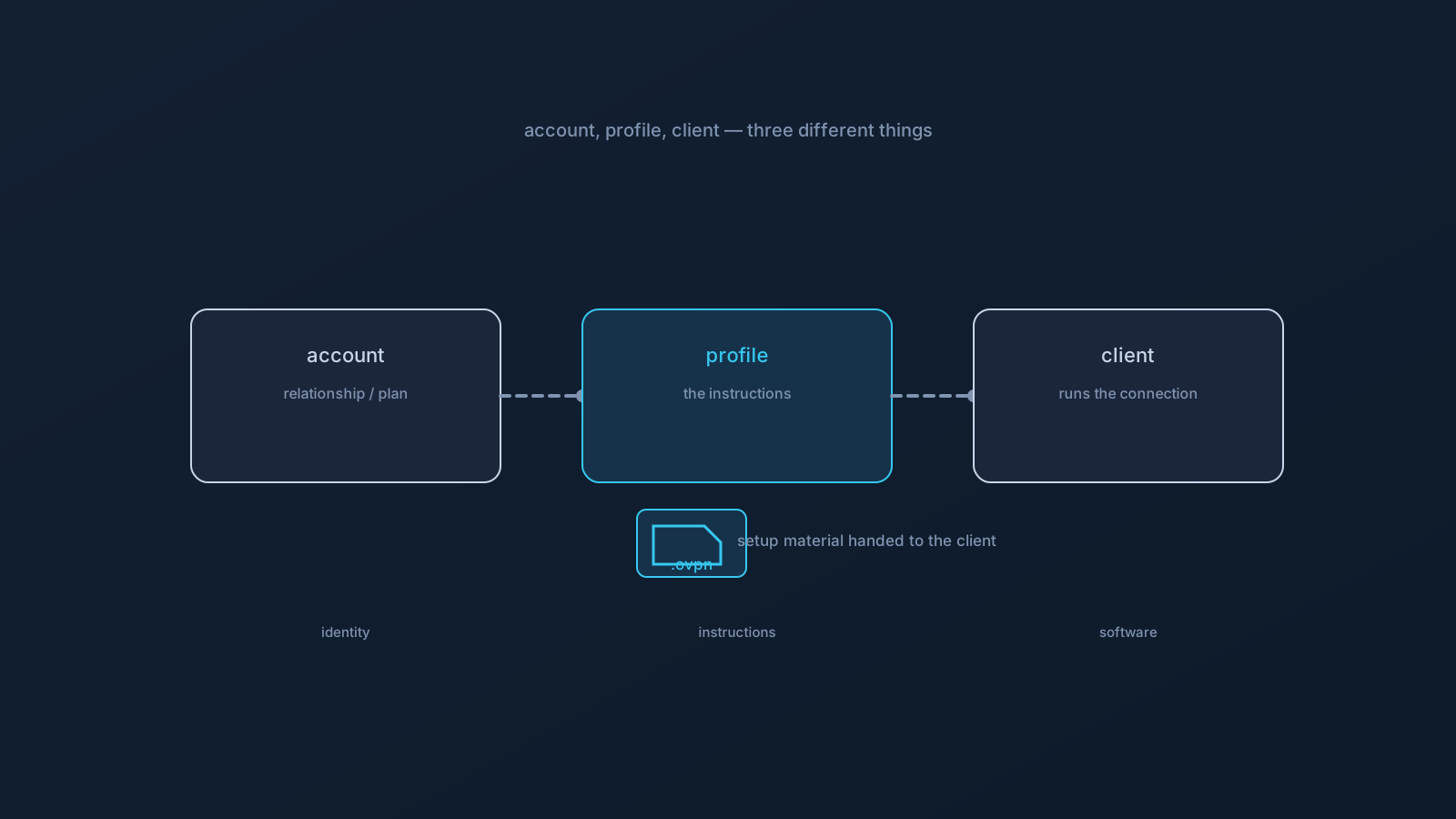
If you're new to VPNs, three words get thrown around as if they mean the same thing: account, profile, and client. They don't — they're three different parts of one setup, and the profile in particular is often misunderstood. This is a plain-language explainer of what a VPN profile actually is, how it differs from your account and your client, and what it doesn't do.
Getting these three straight makes everything else about VPN setup easier to follow, because most beginner confusion comes from mixing them up.
The three parts, quickly
Think of a working VPN setup as three parts with three jobs. Your account is who you are with the provider — your relationship, your plan, the thing you sign in to. Your client is the app on your device that runs the connection — standard software like OpenVPN Connect. And your profile is the setup material that tells the client how to make a particular connection.
Account, profile, client: identity, instructions, software. Keep those three words attached to those three jobs and the rest follows.
So what is a profile, exactly?
A VPN profile is the set of connection settings for one particular connection — the details a client needs to connect the intended way. With Lisar's OpenVPN path, the profile arrives as a .ovpn file you download from your own profile in the Lisar Panel, and setup is the short handshake between the parts: download the .ovpn file, open OpenVPN Connect, choose Upload File, import and save the profile, and connect.
A helpful way to picture it: the profile is a pre-filled instruction sheet for the client. You don't need to read every line on it yourself — the client is the intended reader — you just need to get the right sheet, from the right place, to the right app. The profile describes the connection; the client performs it.
A profile is not your account
Here's the distinction that matters most, and the one the title points at: having a profile is not the same as account ownership or permission. Your account is your relationship with the provider — the plan you're on, what you're entitled to, the thing you sign in to and manage. A profile is just setup material handed to a client.
Practically, that means a profile doesn't decide what you're allowed to do, doesn't grant access to anything on its own, and isn't a substitute for the account behind it. Questions about your plan, what your profile includes, or your account status are account-layer questions — answered in the Lisar Panel, which is the source of truth for anything profile- or plan-specific. The profile is the instructions; the account is the relationship and the decisions.
A profile is not the client either
The profile and the client are also different things, and it's worth separating them. The client is the software doing the work — running the connection, showing you connected or disconnected, reporting its state. It's standard software from its own maker, the same regardless of whose profile it's running. The profile is the specific instructions that particular client follows.
This separation is why the same client can run different profiles, and why "the app says disconnected" (a client-and-device question) is a different kind of question from "what does my profile include?" (an account-and-Panel question). Same setup, different parts, different questions.
Handle a profile like setup material
Because a profile carries the settings for how a specific connection is made, treat it as sensitive setup material — the same standing habits this series always recommends. Download it fresh from your own account in the Lisar Panel, keep it to your own devices, and don't forward or share profile files with other people. If someone else needs a VPN, they get their own profile from their own account, not a copy of yours.
This article doesn't walk through a profile file's internal technical contents, and you don't need to open or read one to use it — the client is the thing that interprets it. If a setup step ever asks for a specific value, that value comes from your Lisar Panel or the official setup instructions for your profile, not from reading the file yourself.
The beginner's summary
- A VPN setup has three parts: the account (your relationship and plan), the profile (the setup instructions), and the client (the software that runs the connection).
- A profile is connection settings for one connection — a pre-filled instruction sheet the client reads.
- A profile is not account ownership or permission: it doesn't decide what you're allowed to do, and account/plan questions belong in the Lisar Panel.
- A profile is not the client: the client is the software; the profile is the instructions it follows.
- Handle a profile as sensitive setup material — fresh from your own account, kept to your own devices, never shared.
Keep account, profile, and client as three separate ideas, and VPN setup stops feeling like one confusing thing and starts feeling like three simple ones.
Frequently asked questions
What's the difference between a VPN profile and a VPN account? Your account is your relationship with the provider — your plan, what you're entitled to, the thing you sign in to. A profile is setup material: the connection settings a client reads to connect. A profile doesn't grant access or decide permissions; account and plan questions live in the Lisar Panel.
Is a VPN profile the same as the app I install? No — the app is the client, standard software that runs the connection and shows its state. The profile is the specific instructions that client follows. The same client can run different profiles, which is why they're separate ideas.
Do I need to open or read my profile file? No — the client is the intended reader. You download the .ovpn file fresh from your own Lisar Panel profile and import it as-is; there's no need to open, read, or edit its contents. Any value a setup step needs comes from the Panel or official instructions.
Can I share my profile with someone who needs a VPN? No — a profile is sensitive setup material, kept to your own devices and not forwarded or shared. Anyone who needs a VPN gets their own profile from their own account, which is what keeps setup material where it belongs.
Where do I check what my profile or plan includes? The Lisar Panel — it's the source of truth for anything profile- or plan-specific. GeoDNS, DNS AdBlock and Custom Exit are available according to plan, and what applies to your profile is shown there rather than inferred.