
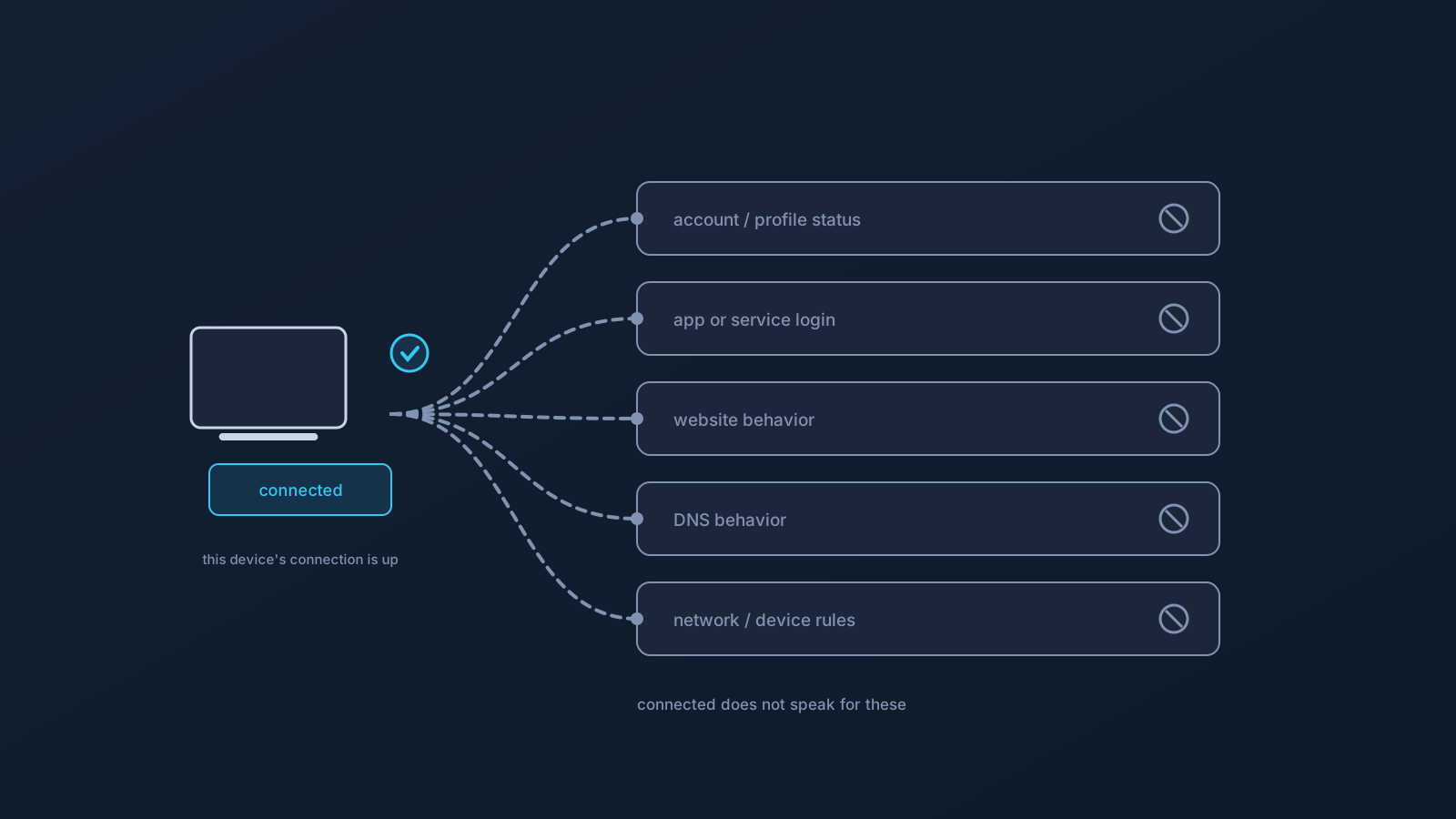
When a VPN client shows connected, it's telling you something specific — and it's easy to read far more into that little word than it actually says. Understanding exactly what connected means, and the several things it doesn't mean, prevents a lot of misplaced worry and misdirected troubleshooting. This article draws those lines clearly.
The short version: connected means the client has established its connection on that device, right now. That's genuinely useful to know. It just isn't a statement about your account, your other apps, or how the wider internet will treat you.
What "connected" does mean
A VPN client's connected state means the client has successfully established the VPN connection on the device you're looking at, at this moment. The connection is up; your device's traffic is taking the VPN's path rather than going out directly. For everyday purposes, that's what you want to confirm, and the client saying connected is the primary signal that it's happened.
It's a real, specific fact — "this device's VPN connection is currently established." The care comes in not stretching that fact past what it covers.
It does not mean your profile or account status is a certain way
Connected describes the client on this device right now; it's not a readout of your account or profile status. Those live at the account layer, shown in the Lisar Panel, and they can be true or change independently of whether a given device is connected at this moment. A device being connected doesn't confirm anything about your plan or profile beyond the fact that this connection came up — and conversely, questions about profile or plan status are answered in the Panel, not read off the client's indicator.
Connection state and account status are two different layers, and the client speaks only for the first.
It does not mean you're signed in to any app or service
A common surprise: being connected through the VPN says nothing about your login state in any app or service. Apps and services have their own sign-in and session handling, entirely separate from your network connection. You can be VPN-connected and signed out of something, or signed in to something and not VPN-connected — the two are unrelated.
So if an app asks you to sign in or verify while you're connected, that's the app's own account layer doing its job, not a sign the VPN connection failed. The connection carries traffic; it doesn't manage your logins.
It does not mean any website will behave a certain way
Connected doesn't promise how any website or service will respond to you. Services apply their own rules and checks regardless of your connection — a connected VPN is not a lever over what they decide, exactly as this series has covered elsewhere. A site might load or not, let you in or ask you to verify, behave one way or another — and none of that is settled by the client showing connected.
The connection changes your traffic's path. It doesn't change the decisions made at the other end by services running their own logic.
It does not confirm DNS behavior or override network rules
Two more boundaries. Connected doesn't tell you exactly how name lookups are behaving — DNS has several owners on a device, and while a profile can handle DNS as part of the connection, "connected" by itself isn't a report on that layer. And connected doesn't override the rules of the network you're on or your device's policies: a network you don't control still has its own configuration, and a managed device still follows its policy, connection or not.
Where a plan includes routing features, they apply as plan properties while connected — GeoDNS, DNS AdBlock and Custom Exit are available according to plan. — but that's a plan fact confirmed in the Panel, not something the connected indicator itself certifies.
And it is not a privacy or security assurance
Stated plainly, and without using stronger words than are honest: a connected state is not, by itself, a promise about privacy or security. It confirms that the client's connection is established and that your traffic is taking the VPN's path — nothing more. Privacy and security are broader matters that a single connection indicator doesn't settle, and reading "connected" as an assurance of them is exactly the over-reading this article is meant to prevent.
The honest reading of "connected"
- Connected means: this device's VPN connection is established right now, and traffic is taking the VPN's path.
- It does not mean: your profile or account status is a certain way (that's the Panel's layer).
- It does not mean: you're signed in to any app or service (that's each app's own layer).
- It does not mean: any website will behave a particular way (services run their own checks).
- It does not certify: exactly how DNS behaves, and it does not override a network's rules or a managed device's policy.
- It is not, by itself, a privacy or security assurance.
Read connected as the precise, useful, limited fact it is — this device's connection is up — and both your troubleshooting and your expectations land in the right place.
Frequently asked questions
What does it mean when my VPN client says connected? It means the client has established the VPN connection on that device right now, and your traffic is taking the VPN's path. It's a specific, useful fact about this device's current connection — not a statement about your account, your apps, or how websites will treat you.
If I'm connected, does that mean my account or profile status is fine? Not necessarily — connection state and account status are different layers. Connected describes the client on this device now; profile and plan status live in the Lisar Panel and can change independently. Check the Panel for account-layer questions.
I'm connected but an app asked me to sign in again. Did the VPN fail? No — being connected says nothing about your login state in any app. Apps handle their own sign-in and sessions separately from your network connection. A sign-in prompt while connected is the app's own account layer, not a connection failure.
Does connected mean a website will let me in or behave a certain way? No — services apply their own rules and checks regardless of your connection. Connected changes your traffic's path, not the decisions made at the other end. A site may still load or not, or ask you to verify, independent of the connected state.
Is a connected VPN a privacy or security assurance? No — by itself, connected confirms the connection is established and traffic is taking the VPN's path, nothing more. Privacy and security are broader matters a single connection indicator doesn't settle.