
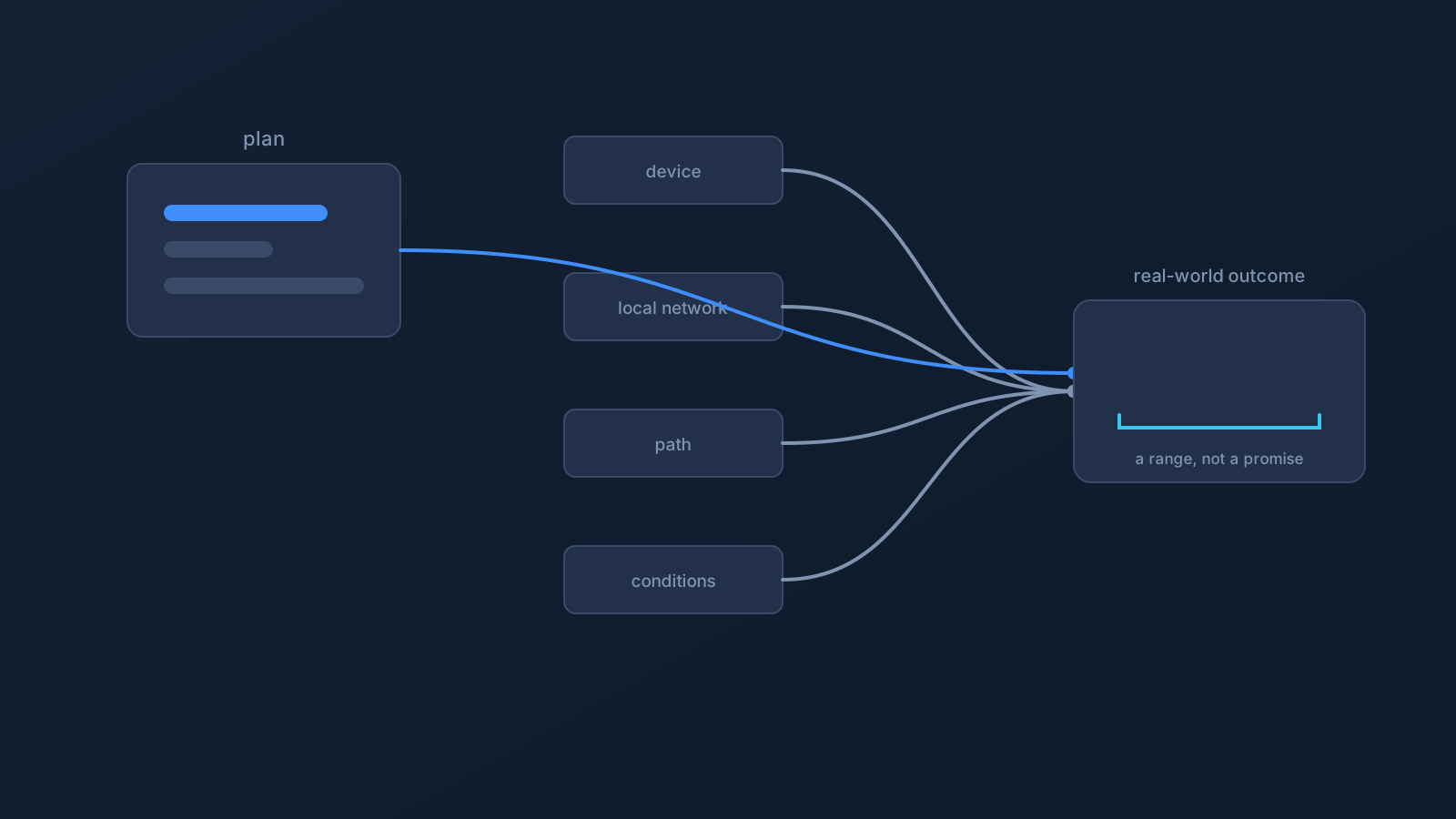
"How fast is the VPN?" is really two questions wearing one sentence, and most speed frustration comes from not separating them. One question is about a specification: what speed information applies to your plan. The other is about an outcome: what throughput you actually experience at a given moment, on a given network, to a given service. The first has a definite answer. The second has a range — always.
This article separates the two, walks through what actually shapes the range, and is blunt about the part no honest provider will dress up: what a VPN cannot promise about speed.
The specification: what your plan says
Lisar plans include speed information as part of what defines each plan, and the place to see what applies to yours is the Lisar Panel and the pricing page. That's a product fact, and it's worth checking rather than assuming — plans differ, and the Panel shows what's actually attached to your profile.
What that specification is not is a promise about any individual moment. A plan's speed information describes the plan; it doesn't guarantee that any particular connection, on any particular network, to any particular service, will experience any particular number. The difference between those two sentences is the whole subject of this article.
The outcome: why real-world performance is a range
Between your plan and your experience sits everything else, and everything else has opinions:
- Your device. Hardware, load, OS state, and what else is running all shape what a device can push through any connection, VPN or not.
- Your local network. Wi-Fi quality, distance from the router, interference, and how busy the local network is often dominate the experience before anything else gets a vote.
- The network path. A connection travels a real route, and longer or busier paths behave differently from short quiet ones — at different times of day, from different places, over different networks.
- Current conditions. Networks along the way, including the one you're sitting on, have their own load and their own moments.
- The service on the other end. The website, app, or platform you're using has its own capacity, its own limits, and its own decisions — none of which any VPN controls.
- The setup itself. Different setup paths and device scenarios can behave differently; the same profile on two devices is two experiences, not one.
No single factor is "the" answer, which is precisely why the honest unit for real-world VPN performance is a range, not a number.
What a VPN cannot promise
Plainly, because this is where marketing usually blinks: no VPN — Lisar included — can promise a specific speed at a specific moment on a network it doesn't control. A VPN cannot promise that performance will be the same on every network, in every place, at every hour. It cannot promise to make a slow connection fast. And Lisar does not make speed-superlative claims or speed guarantees, and makes no promise that connecting will improve performance.
A VPN establishes a connection path; it doesn't repeal the conditions that path runs through. Any speed conversation that skips that sentence is selling something.
Sane expectations when speed feels off
Variability is normal, so the first response to a slow moment is calibration, not alarm. Reasonable, non-technical sanity checks: is the device itself busy or struggling; does the local network feel slow for everything, not just the VPN; does the same setup behave differently on a different network or at a different time? Those three questions locate most slow moments without touching a single setting.
If something still seems genuinely wrong with the setup rather than the surroundings, the path is the usual one: the setup guide for your device, your profile in the Lisar Panel, and official Lisar support — not improvised changes to a working configuration, and not advice threads promising speed tricks.
The honest summary
Check the Panel and pricing for the specification that applies to your plan. Expect the outcome to be a range shaped by device, local network, path, conditions, and the service on the other end. And treat any absolute speed promise — from anyone — as the tell that expectations are being sold rather than set.
Frequently asked questions
What speed will I get with Lisar? Your plan's speed information — shown in the Lisar Panel and on the pricing page — is the specification that applies to your plan. Real-world performance at any moment is a range shaped by your device, local network, the network path, current conditions, and the service you're using.
Does Lisar guarantee my connection speed? No. No VPN can promise a specific speed at a specific moment on networks it doesn't control, and Lisar does not make speed-superlative claims or speed guarantees. Plan speed information describes the plan, not any individual moment.
Will using a VPN make my internet faster? That's not what a VPN is for, and no such improvement is promised. A VPN establishes a connection path; the conditions that path runs through still apply.
Why is my speed different at the hotel than at home? Because almost everything relevant changed: the local network, the path, the conditions, and possibly the device's situation. Different networks producing different performance is normal, not a fault.
What should I check if my connection seems unusually slow? Start with the surroundings: is the device busy, is the local network slow for everything, does a different network or time behave differently? If the setup itself seems wrong after that, use the setup guide, your Panel profile, and official Lisar support rather than improvised changes.