
Small teams rarely lack VPN knowledge — they lack written VPN knowledge. The setup path lives in one person's memory, the router history in another's, and the answer to "who do we ask?" in a chat thread nobody can find. Then the person who knew leaves, or is on holiday the week something changes, and the team rediscovers everything the hard way.
The fix costs one page. This article is what goes on it, why each line earns its place — and, just as important, what must never be written down.
What the one page is for
Team documentation does one job: it makes the team's setup knowledge survive contact with absence — vacations, departures, growth, and plain forgetting. It's not a manual (the setup guides are the manual) and it's not a policy document (the company's policies are elsewhere); it's the team's index card: where things are, which path is approved, and who answers what.
Kept that small, it actually gets maintained. The failure mode of team documentation isn't missing detail — it's ambition, the twelve-page document nobody updates. One page, reviewed when something changes, beats it every time.
What to record
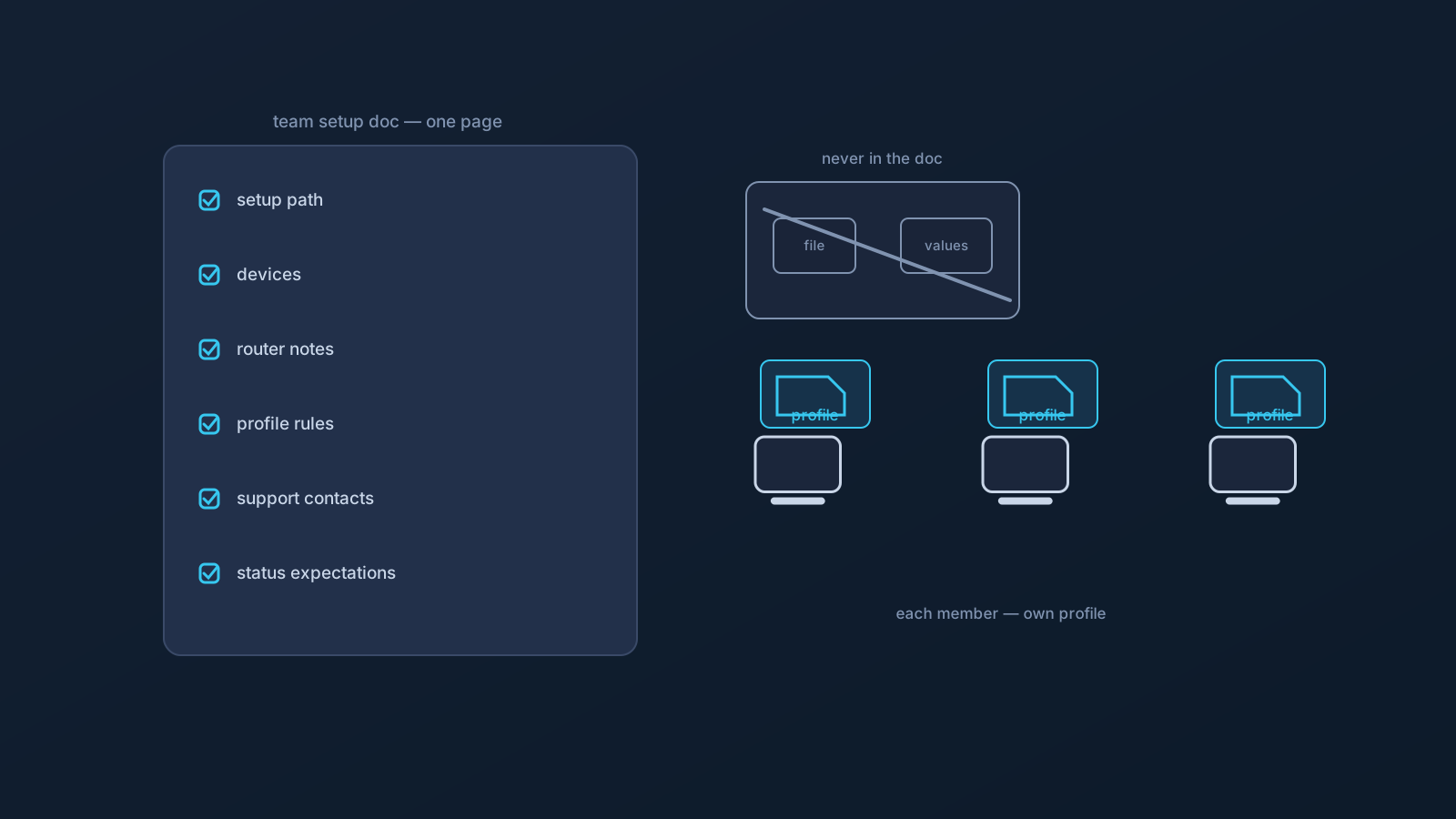
The approved setup path. One line stating the team's standard: each member sets up from their own profile in the team's Lisar Panel via the supported flow — download the .ovpn file, open OpenVPN Connect, choose Upload File, import and save the profile, and connect — following the setup guide for their device. Writing the path down is what makes "how do I set up?" a link instead of a conversation.
Supported devices, honestly. Which device types the team actually supports, which are each member's own responsibility, and which are managed devices where the policy owner decides. A short list prevents the recurring "will it work on my X?" thread — and "ask the policy owner first" is a perfectly good entry for the managed column.
Router notes, if the team has any. If a compatible router setup exists anywhere — an office, a shared space — record where it is, that it covers only what it covers, and who planned it. If there isn't one, a single line saying so prevents the periodic reinvention conversation.
Profile handling rules. The team's one-sentence law, written where nobody can claim they missed it: one profile per member, everything from your own profile in the Panel, and nothing setup-related — profile files, credentials, profile details — ever shared through chat, email, docs, or drives.
Support contacts, split correctly. Two lines: the Lisar side (Panel, setup guides, official support) for profile and setup questions; the company side (whoever owns IT and policy) for device policy, access, and everything the VPN doesn't decide. Most team confusion is asking the right question at the wrong desk.
Status expectations. A line noting that profiles have status that can change, that the Panel is the source of truth for what's true about a profile, and where to look before assuming anything about renewal or availability. It saves the quarterly "wait, is mine still active?" scramble.
What must never be in the doc
The documentation records paths and rules — never the sensitive material itself. No downloaded profile files attached "for convenience." No credentials, codes, or profile-specific details pasted in. No screenshots of working setups with details visible. The moment any of those enters the document, the document becomes exactly the shared artifact the team's own rules prohibit — a copy that outlives its context in a place designed to be found.
The test for any proposed line: could this page be read by a future teammate on day one, or leak beyond the team, without exposing anything? Paths, rules, and contacts pass. Files and values never do.
What the doc deliberately is not
Stated plainly, because a tidy internal page tempts inflation: this documentation organizes the team's VPN setup knowledge, and it replaces nothing else. It is not the company's identity and sign-on controls, not device management or device policy, not access rules, not compliance processes, and not a security program — those remain the company's own layers, owned by its own functions, exactly as this series has said throughout. The doc's authority ends where it should: at describing the team's connectivity practices accurately.
Teams that respect that boundary get the real prize — a page that new members trust because it doesn't overreach, staying accurate precisely by staying small.
Keeping it alive
Maintenance is three habits. Put the page where the team's working agreements already live, so it's found by default. Touch it when reality changes — a new device type, a router decision, a support contact change — rather than on a schedule nobody keeps. And hand it to every new member on day one as the first link in onboarding, which is both the page's best use and the surest way to discover what's gone stale.
One page, six sections, a never-include rule, and a day-one habit: that's the whole practice, and it's the difference between a team that knows its setup and a team that used to.
Frequently asked questions
What should a small team's VPN documentation include? Six short sections: the approved setup path, supported devices (including which are managed), router notes if any, the profile handling rules, support contacts split between the Lisar side and the company side, and where to check profile status. One page total.
Should we attach the profile files to the doc so new members set up faster? Never. The doc records paths and rules, not sensitive material — no profile files, credentials, or profile-specific details. New members set up from their own profile in the team's Lisar Panel, which is faster than it sounds and leaves nothing to leak.
Who should own the team's VPN documentation? Whoever owns the team's working agreements generally — the point is a named owner and a known home, not a particular role. The doc gets touched when reality changes and handed to every new member on day one.
Does good documentation cover our security needs? No — it organizes connectivity knowledge and replaces nothing: identity and sign-on controls, device management, access rules, and compliance processes remain the company's own layers. The doc's job is describing the team's setup practices accurately, and only that.
How do we keep the doc from going stale? Keep it to one page so updating is trivial, store it with the team's existing working agreements, update on change rather than on schedule, and use it as the first onboarding link — new members are the most reliable stale-detector a document can have.