
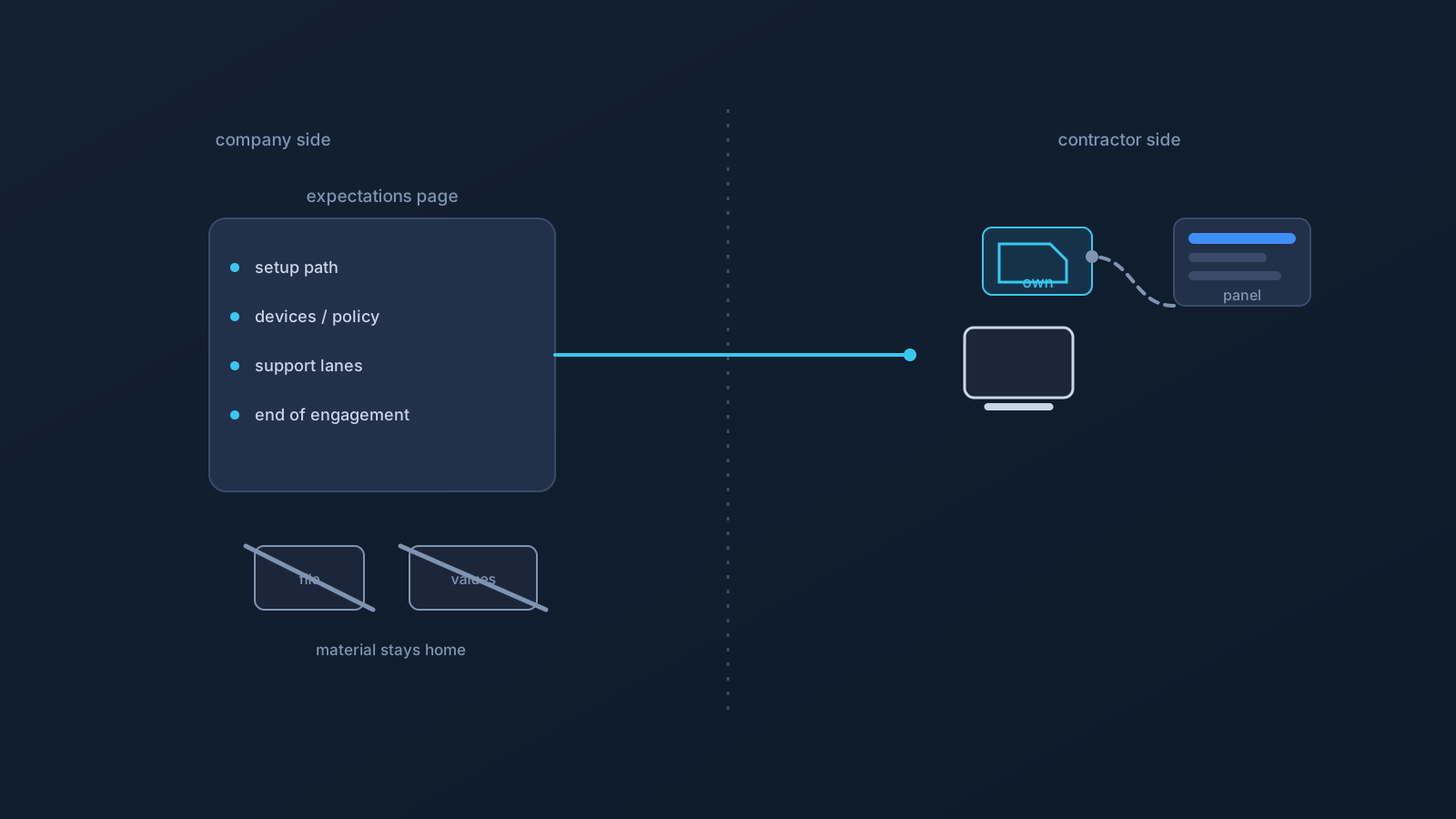
Contractor onboarding has a bad default: someone helpful pastes "everything you need" into a chat thread, and setup information that should never have left its proper home starts an engagement by traveling. The fix isn't less help — it's help in the right shape. Contractors need shared expectations: a clear, written picture of how setup works here. What they must never receive is the shared material: files, credentials, values, or details that identify how anything internal actually works.
This article is the pattern: what to put in a contractor-facing expectations page, what stays out of it categorically, and the boundary that keeps the whole exercise honest.
Expectations are a document; secrets are not
The distinction that carries everything: an expectation describes how things are done; a secret is the material itself. "You'll set up from your own profile using the supported flow" is an expectation — safe to write, safe to send, safe to reuse for the next contractor. A profile file, a credential, a screenshot showing setup values, or a description of internal security arrangements is material — and material has proper homes (the Panel, official channels, the company's own systems) that a contractor onboarding thread is not.
Write the expectations once; never transmit the material at all. Everything below is that sentence, applied.
What the expectations page should say
A contractor-facing page needs five short entries. The setup path: each contractor sets up from their own profile with their own Lisar Panel access, via the supported flow — download the .ovpn file, open OpenVPN Connect, choose Upload File, import and save the profile, and connect — following the setup guide for their actual device, with any required values taken from the Panel or official setup instructions only. Device expectations: which device categories are in scope, and the standing rule that company- or client-managed hardware follows its policy owner — asked first, always. The no-sharing rule, stated to them directly: nothing setup-related moves through chat, email, or shared documents — not to them, not from them, not between contractors. Support lanes: Lisar-side questions (profile, setup, status) go to the Panel, the guides, and official Lisar support; company-side questions (policy, access, devices) go to the named company contact. End-of-engagement expectations: setup was per-person from the start, so wrapping up is straightforward — downloaded profile files come off contractor devices, and anything account-side routes through the Panel and official support rather than through improvisation.
That's a page a contractor can be sent on day one, and the same page for every contractor after — which is precisely the point.
What never goes to a contractor — or into the page
The categorical list, because categorical is the only version that holds under deadline pressure: no profile files (theirs comes fresh from their own Panel access; nobody else's, ever), no credentials of any kind, no screenshots containing setup values or profile-specific details (screenshots get checked before sending — by everyone, in both directions), and no descriptions of the company's internal security arrangements, which a contractor doesn't need for VPN setup and an expectations page doesn't need for clarity.
Notice the last one. Onboarding docs drift toward over-explaining — "here's how our systems check things" — and every sentence of that is material leaving home without a job to do. The expectations page describes the contractor's own path; the company's internals stay internal.
What setup expectations don't replace
Stated plainly, because contractor arrangements make the temptation specific: a clear VPN setup expectation replaces nothing about how the company governs access and conduct. Identity checks remain identity checks. Device policy remains the policy owner's call on managed hardware. What a contractor may reach is decided by the company's own access controls — a working connection grants nothing those controls don't grant. Contractual terms remain their own layer entirely. And the company's internal security rules and processes continue as they were, unmentioned in the onboarding page and unmoved by it.
A contractor with a perfect setup and a signed expectations page has exactly one thing: a supported, per-person connection path. Everything about what that connection may be used for, and reach, lives with the company's own controls and agreements — which is where it belongs.
Making the pattern routine
The pattern sustains itself once it's the default. The expectations page lives with the team's other working agreements, owned by whoever holds the support-contact role, updated when practice changes. New contractors get it as the first onboarding link. And the one-line test keeps everyone honest on both sides of every message: if this would matter in the wrong hands, it doesn't go in the thread. Expectations travel; material doesn't. Engagements that start that way tend to end just as cleanly — which is what the whole pattern was for.
Frequently asked questions
What's the right way to onboard a contractor quickly and safely? Send the expectations page: their own Panel access, the supported setup flow, the device rules, the support lanes, and the end-of-engagement plan. It's written once and reused — and it contains no files, credentials, or values, ever.
The contractor is stuck — can we send a screenshot of a working setup to compare? Check it first, and usually don't: screenshots showing setup values or profile-specific details are material, not help. Point them to the setup guide for their device and the values shown in their own Panel; that's the comparison that's safe and correct.
Do contractors need to know how our internal security works to set up a VPN? No — and it shouldn't be in the onboarding page. Their path is their own profile, the supported flow, and the named support lanes. The company's internal arrangements stay internal; over-explaining is material leaving home without a job.
Does a proper VPN setup give the contractor access to our systems? No. A working connection grants nothing the company's own access controls don't grant — identity checks, device policy, and contractual terms all remain their own layers, unchanged by setup.
What happens on the VPN side when the engagement ends? If setup was per-person from the start, it's straightforward: downloaded profile files come off the contractor's devices, and anything account-side goes through the Panel and official Lisar support. Clean endings are designed at onboarding.