
Plenty of people need to keep using their home-country online services while they're somewhere else: a banking app, a tax portal, a healthcare system, an education account, an insurance provider, or some other local service tied to home. Being abroad can sometimes make that harder, since some services weigh a user's apparent network location as part of how they decide what to allow.
A VPN may be part of a prepared setup for situations like this, but it isn't a guaranteed solution, and it isn't a way around a service's own rules or requirements. This article looks at why some services can behave differently from abroad, what a VPN can realistically help with, and what it can't.
This article is not legal advice, does not provide country-specific availability guidance, and does not replace the rules or support guidance of the service a user is trying to access.
Why home-country services may behave differently abroad
Many online services, including banking, tax, healthcare, education, insurance, and public-sector portals, are built with some awareness of where a user appears to be connecting from. That's often part of routine account security and fraud prevention, not something aimed at any particular person or trip.
Being abroad can sometimes change how a service responds: it might ask for extra verification, restrict certain actions, or in some cases not work as expected at all. This varies enormously by service and isn't something this article can generalize about, since every provider sets its own rules. It's a fact of using services designed primarily around one country's context, not a sign that anything has gone wrong.
Network location is only one signal
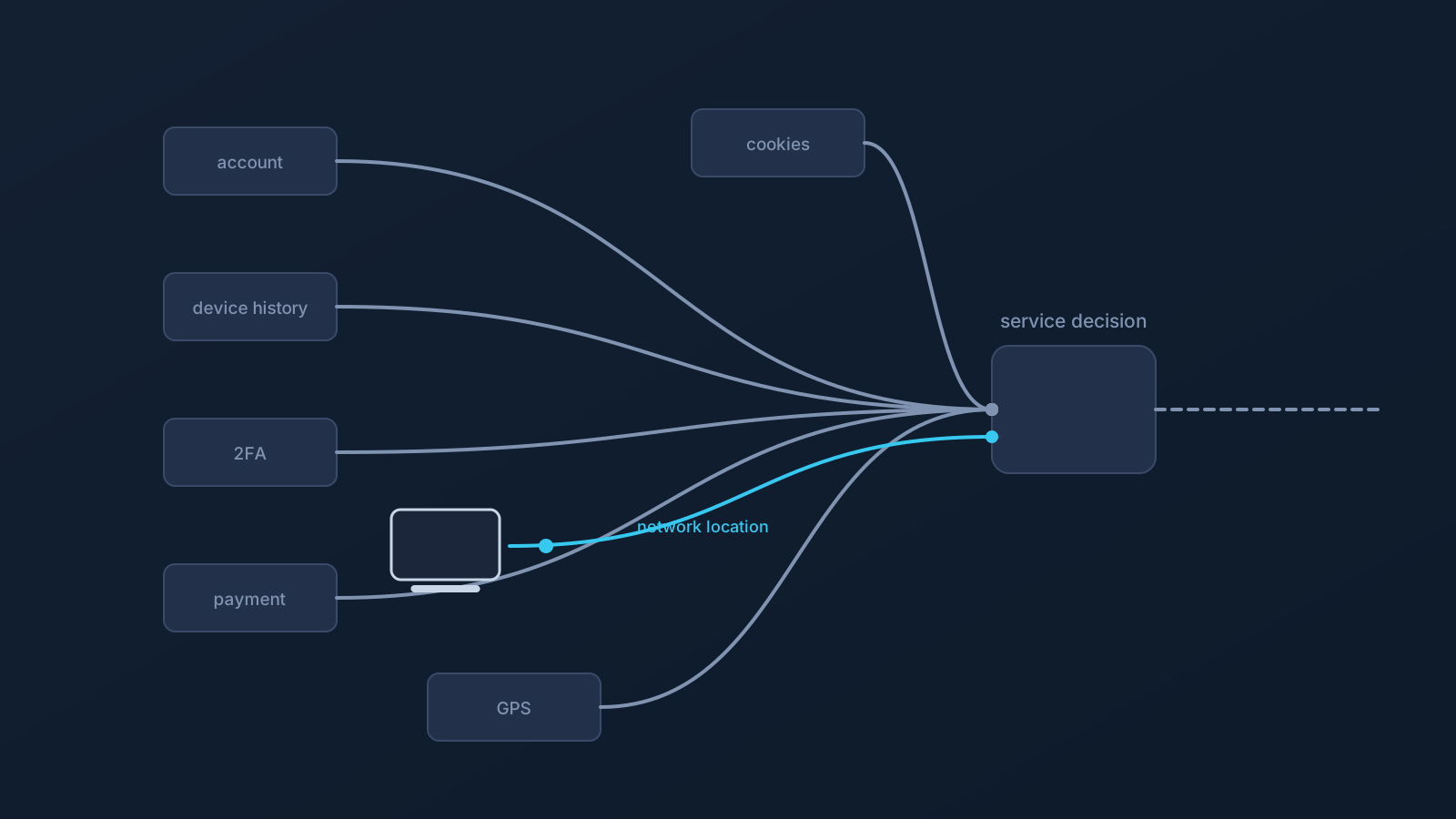
Network location, the kind of thing a VPN can influence, is usually just one input among several a service might use to decide how to treat a connection. Account region settings, a device's history with that account, cookies, official app checks, GPS or location permissions, SMS or two-factor verification, payment or billing region, fraud-prevention checks, and a service's own internal policy can all play a role too, sometimes instead of network location, sometimes alongside it.
Because of that mix, changing one signal doesn't mean a service will treat a connection any differently overall. A service that leans heavily on account history or device checks, for example, may behave the same way regardless of network location. This is worth understanding before assuming any particular setup will change how a service responds.
Where VPN setup may help
Where it's supported, a VPN can be a practical part of a setup for people moving between countries, devices, and networks. It can offer a prepared VPN setup for the network-location part of the picture, and standard VPN setup methods can make that easier across multiple devices.
Lisar's supported setup path keeps this kind of setup simple: you download the .ovpn profile file from your own profile in the Lisar Panel and import it in OpenVPN Connect using Upload File, without a mandatory proprietary Lisar app on every device. Setting up and testing before leaving home, on a familiar network, is easier than doing it for the first time while already abroad. None of this amounts to a guarantee that any particular portal or service will work as expected, and it doesn't mean every device or router setup is supported; it's preparation, not a promise.
Why VPN setup cannot guarantee access
Even with a well-prepared VPN setup, a service can still apply its own account, fraud, identity, app, device, or policy rules, and a VPN doesn't override any of them. To be direct about the limits:
- A VPN does not guarantee access to government, banking, tax, healthcare, education, insurance, or local account portals, or to any other particular website, app, or service.
- A VPN does not guarantee bypassing or unblocking anything, and it isn't designed as a way to get around a service's rules.
- A VPN does not guarantee that a service will treat a user as being in a particular country, even where a feature like Custom Exit or GeoDNS applies.
- A VPN does not change where a device physically is.
- A VPN does not replace official authentication, SMS or two-factor verification, required apps, account verification, payment-region checks, device checks, GPS or location permission checks, or a service's general policy.
- A VPN does not guarantee anonymity or any particular speed.
If a service's own rules require something a VPN setup can't provide, contacting that service directly is a more reliable path than assuming a different setup will resolve it. This article isn't legal advice and doesn't cover country-specific availability, compliance, or regulatory questions; a service's own terms, and any applicable local law, are outside what this article can speak to.
Account and profile safety while abroad
The same account-safety habits that matter for any travel setup matter here too. Use profile-specific setup information shown in the Lisar panel rather than relying on an old screenshot or saved message, and avoid posting a downloaded .ovpn profile file's contents publicly or leaving profile details visible in a screenshot, even one shared to ask for help.
Shared or public devices deserve extra caution: avoid saving connection details on a device that isn't a user's own, and sign out of anything that shouldn't stay accessible to the next person who uses it. These habits are covered in more depth in the "VPN Profile File Safety" article.
Public Wi-Fi and shared networks
Hotel, airport, café, coworking, mobile, and other shared networks can behave inconsistently, which is a normal part of being away from a familiar home setup rather than a reason for alarm. A VPN can be part of reasonable travel preparation on networks like these, but it isn't a complete safety guarantee by itself, and not every hotel, airport, mobile, public, or work network will necessarily allow or support every setup.
Safe browsing habits, keeping devices updated, ordinary device security, and normal account caution, like not logging into sensitive accounts on a device or network that feels untrustworthy, still matter regardless of VPN use.
Company-managed devices and business travel
Company-managed devices often come with restrictions on which apps can be installed, which network or VPN settings can be changed, or which profiles or browser behaviors are allowed. Those restrictions exist for reasons specific to each organization, and following them is part of using a work device responsibly.
Standard VPN setup doesn't override device policy; what's possible on a company-managed device still depends on what that device and its policy allow. For business or team travel, planning ahead and involving official support, both an employer's IT team and Lisar's, tends to go more smoothly than improvising.
Where GeoDNS, DNS AdBlock, and Custom Exit fit
A few other Lisar features can come up in this kind of setup, where a plan includes them. GeoDNS is DNS-related behavior, not a guaranteed region switch, and it isn't the same thing as Custom Exit. DNS AdBlock may help reduce some unwanted DNS requests, not a universal ad blocker, and it isn't the same as malware protection, antivirus, or browser-level ad blocking. Custom Exit relates to VPN traffic exit behavior where eligible, not a physical-location change, a content-access guarantee, or a universal country switch.
All three depend on plan and, in some cases, custom review, and none of them comes with an open choice of any entry or exit location or a self-service way to switch between them. None is a requirement for basic setup, and none changes anything covered above about account rules or service-specific behavior. Each has its own dedicated article and feature page for anyone who wants more detail.
What to check before relying on VPN setup abroad
Before relying on a VPN setup for a home-country service while abroad, it's worth checking a few things: profile-specific setup information in the Lisar panel, Lisar's setup guides for compatible clients and devices, and testing the setup before travel where that's possible.
It's also worth keeping profile details private throughout, and keeping in mind that the specific service being accessed has its own rules, and that local laws can apply depending on where a user is. For a problem with a specific portal or account, that service's own support is the right place to go; for a problem with Lisar setup itself, Lisar's official support is the right place.
Frequently asked questions
Will a VPN guarantee I can access my home bank or government portal from abroad? No. A VPN does not guarantee access to banking, tax, healthcare, education, insurance, government, or any other portal. Many services use more than network location to decide access, so a VPN addresses only part of the picture.
Why might a service behave differently when I'm abroad? Often it's routine account security or fraud prevention rather than anything aimed at a specific person. Services may use account history, device checks, SMS/2FA, payment region, and other signals alongside or instead of network location.
Is this article giving me legal advice about accessing services abroad? No. This article isn't legal advice and doesn't cover country-specific rules or compliance questions. A service's own terms, and any applicable local law, are outside what it can speak to.
Does a VPN override a service's own access rules? No. A VPN does not override a service's own account, identity, app, device, fraud-prevention, legal, or policy requirements. Users should follow the service's own rules and support guidance.
Does GeoDNS or Custom Exit guarantee a service will treat me as being in my home country? No. Neither guarantees that outcome, and neither is the same as the other. Both depend on plan and eligibility, and a service may rely on signals beyond network location regardless.
Should I set up my VPN before I travel or once I'm abroad? Before, where possible. Testing a profile at home, on a familiar network, is easier than troubleshooting it for the first time while already away.
Will my company-managed device support this kind of setup? That depends on the device's IT policy, not on Lisar. Company-managed devices can restrict app installs or network settings, and those restrictions should be followed.